Structure and Concepts
Structure of a State Machine
A State Machine is represented by a JSON Object.
Example: Hello World
The operation of a state machine is specified by states (which are also represented by JSON objects) fields in the top-level "States" object. In this example, there is one state named "Hello World".
{
  "Comment": "A simple minimal example of the Milwaukee Tool States Language",
  "StartAt": "Hello World",
  "States": {
    "Hello World": {
      "Type": "Task",
      "Resource": "OpenLink:SendCommand",
      "Parameters": {
        "MessageType": "01",
        "IsWrite": true,
        "RouteType": "Tool",
        "CommandBody": "A02301"
      },
      "End": true
    }
  }
}
When this state machine is executed, the interpreter begins execution by identifying the Start State. It executes that state, and then checks to see if the state is marked as an End State. If it is, the machine terminates and returns a result. If the state is not an End State, the interpreter looks for a "Next" field to determine what state to run next; it repeats this process until it reaches a Terminal State (Succeed, Fail, or an End State) or a runtime error occurs.
In this example, the state machine contains a single state named "Hello World". Because "Hello World" is a Task State, the interpreter tries to execute it. Examining the value of the "Resource" field shows that it needs to send an OpenLink Command to the currently connected tool. Assuming the OpenLink command executes successfully, the machine will terminate successfully returning the result of sending the OpenLink command.
Top-level fields
A State Machine MUST have an object field named "States", whose fields represent the states.
A State Machine MUST have a string field named "StartAt", whose value MUST exactly match one of names of the "States" fields. The interpreter starts running the the machine at the named state.
A State Machine MAY have a string field named "Comment", provided for human-readable description of the machine.
A State Machine MAY have a string field named "MTSLLanguageVersion", which gives the version of the States language used in the machine. This document describes version 1.0, and if omitted, the default value of "MTSLLanguageVersion" is the string "1.0".
A State Machine MAY have an integer field named "TimeoutSeconds". If provided, it provides the maximum number of seconds the machine is allowed to run. If the machine runs longer than the specified time, then the interpreter fails the machine with a States.Timeout Error Name.
Concepts
States
States are represented as fields of the top-level "States" object. The state name, whose length MUST BE less than or equal to 128 Unicode characters, is the field name; state names MUST be unique within the scope of the whole state machine.
States describe tasks (units of work), or specify flow control (e.g. Choice).
Here is an example state machine with one State called "Blink". The "Blink" state is a task that executes an OpenLink Command to cause the currently connected tool to flash it's lights:
{
  "StartAt": "Blink",
  "States": {
    "Blink": {
      "Comment": "A simple state that sends a simple command",
      "Type": "Task",
      "Resource": "OpenLink:SendCommand",
      "Parameters": {
        "MessageType": "01",
        "IsWrite": true,
        "RouteType": "Tool",
        "CommandBody": "A02301"
      },
      "End": true
    }
  }
}
Note that:
- All states MUST have a "Type" field. This document refers to the values of this field as a state’s type, and to a state such as the one in the example above as a Task State.
- Any state MAY have a "Comment" field, to hold a human-readable comment or description.
- Most state types require additional fields as specified in this document (see appendices).
- Any state except for Choice, Succeed, and Fail MAY have a field named "End" whose value MUST be a boolean. The term "Terminal State" means a state with with
{ "End": true }, or a state with{ "Type": "Succeed" }, or a state with{ "Type": "Fail" }.
Transitions
Transitions link states together, defining the control flow for the state machine. After executing a non-terminal state, the interpreter follows a transition to the next state. For most state types, transitions are unconditional and specified through the state's "Next" field.
All non-terminal states MUST have a "Next" field, except for the Choice State; however, each choice in the Choice state must have a "Next" field that determines which state is next when a specified condition is met. The value of the "Next" field MUST exactly and case-sensitively match the name of the another state.
States can have multiple incoming transitions from other states.
Timestamps
The Choice and Wait States deal with JSON field values which represent timestamps. These are strings which MUST conform to the RFC3339 profile of ISO 8601, with the further restrictions that an uppercase "T" character MUST be used to separate date and time, and an uppercase "Z" character MUST be present in the absence of a numeric time zone offset, for example "2016-03-14T01:59:00Z".
Data
The interpreter passes data between states to perform calculations or to dynamically control the state machine’s flow. All such data MUST be expressed in JSON.
When a state machine is started, the caller can provide an initial JSON text as input, which is passed to the machine's start state as input. If no input is provided, the default is an empty JSON object, {}. As each state is executed, it receives a JSON text as input and can produce arbitrary output, which MUST be a JSON text. When two states are linked by a transition, the output from the first state is passed as input to the second state. The output from the machine's terminal state is treated as its output.
For example, consider a simple State Machine with one state which will attempt to open the COM port to a Communication Adapter:
{
  "StartAt": "Connect to Tool",
  "States": {
    "Connect to Tool": {
      "Type": "Task",
      "Resource": "Product:Connect",
      "Parameters": {
        "CommunicationMethod": "CommunicationAdapter"
      },
      "End": true
    }
  }
}
When this state machine is executed, the output will be a JSON object consisting of the result of running that Task:
{
  "Result": "Success"
}
The usual constraints applying to JSON-encoded data apply. In particular, note that:
- Numbers in JSON generally conform to JavaScript semantics, typically corresponding to double-precision IEEE-854 values. For this and other interoperability concerns, see RFC 8259.
- Standalone "-delimited strings, booleans, and numbers are valid JSON texts.
Paths
A Path is a string, beginning with "$", used to identify components with a JSON text. The syntax is that of JsonPath.
Reference Paths
A Reference Path is a Path with syntax limited in such a way that it can only identify a single node in a JSON structure: The operators "@", ",", ":", and "?" are not supported - all Reference Paths MUST be unambiguous references to a single value, array, or object (subtree).
For example, if state's input data contained the values:
{
  "foo": 123,
  "bar": ["a", "b", "c"],
  "car": {
    "cdr": true
  }
}
Then the following Reference Paths would return:
$.foo => 123
$.bar => ["a", "b", "c"]
$.car.cdr => true
Paths and Reference Paths are used by certain states, as specified later in this document, to control the flow of a state machine or to configure an state's settings or options. These Paths and Reference Paths can also be used to track variables across states (i.e., reading a value with a task state then making a decision on that value with a choice state).
The Generalized Payload Template
A state machine interpreter dispatches data as input to tasks to do useful work, and receives output back from them. It is frequently desired to reshape input data to meet the format expectations of tasks, and similarly to reshape the output coming back. A JSON object structure called a Payload Template is provided for this purpose.
In the Task, Map, and Pass States, the Payload Template is the value of a field named "Parameters". In the Task and Map States, there is another Payload Template which is the value of a field named "ResultSelector".
A Payload Template MUST be a JSON object; it has no required fields. The interpreter processes the Payload Template as described in this section; the result of that processing is called the payload.
To illustrate by example, the Task State below has a field named "Parameters" whose value is a Payload Template. Consider the following Task State:
"StateX": {
  "Type": "Task",
  "Resource": "Some:Resource",
  "Parameters": {
    "first": 88,
    "second": 99
  },
  "Next": "StateY"
}
In this case, the payload is the object with "first" and "second" fields whose values are respectively 88 and 99. No processing needs to be performed and the payload is identical to the Payload Template.
Values from the Payload Template’s input can be inserted into the payload with a combination of a field-naming convention, Paths and Intrinsic Functions.
If any field within the Payload Template (however deeply nested) has a name ending with the characters ".$", its value is transformed according to rules below and the field is renamed to strip the ".$" suffix.
If the field value begins with only one "$", the value MUST be a Path. In this case, the Path is applied to the Payload Template’s input and is the new field value.
If the field value does not begin with "$", it MUST be an Intrinsic Function (see below). The interpreter invokes the Intrinsic Function and the result is the new field value.
If the path is legal but cannot be applied successfully, the interpreter fails the machine execution with an Error Name of "States.ParameterPathFailure". If the Intrinsic Function fails during evaluation, the interpreter fails the execution with an Error Name of "States.IntrinsicFailure".
A JSON object MUST NOT have duplicate field names after fields ending with the characters ".$" are renamed to strip the ".$" suffix.
To illustrate by example again, consider the following Task State:
"StateX": {
  "Type": "Task",
  "Resource": "Some:Resource",
  "Parameters": {
    "flagged": true,
    "parts": {
      "first.$": "$.vals[0]",
      "last3.$": "$.vals[-3:]"
    },
    "weekday.$": "$.DayOfWeek",
    "formattedOutput.$": "States.Format('Today is {}', $.DayOfWeek)"
  },
  "Next": "StateY"
}
Suppose that the input to "StateX" is as follows:
{
  "weekday": "TUESDAY",
  "flagged": 7,
  "vals": [0, 10, 20, 30, 40, 50]
}
In this case, the effective input to the Task identified in the "Resource" field would be as follows:
{
  "flagged": true,
  "parts": {
    "first": 0,
    "last3": [30, 40, 50]
  },
  "weekday": "TUESDAY",
  "formattedOutput": "Today is TUESDAY"
}
Details on what each Task state resource expects as input parameters can be found in Avaliable Task Resources
Intrinsic Functions
The Milwaukee Tool States Language provides a small number of "Intrinsic Functions", constructs which look like functions in programming languages and can be used to help Payload Templates process the data going to and from Task Resources. See Available Intrinsic Functions for a full list of these Intrinsic Functions.
Here is an example of an Intrinsic Function named "States.Format" being used to prepare data:
"StateX": {
  "Type": "Task",
  "Resource": "UI:Prompt",
  "Parameters": {
    "Message.$": "States.Format('Welcome to MTSL, {} {}', $.firstName, $.lastName)"
  },
  "Next": "Y"
}
-
An Intrinsic Function MUST be a string.
-
The Intrinsic Function MUST begin with an Intrinsic Function name. An Intrinsic Function name MUST contain only the characters A through Z, a through z, 0 through 9, ".", and "_".
All Intrinsic Functions defined by this specification have names that begin with "States.". Other implementations may define their own Intrinsic Functions whose names MUST NOT begin with "States.".
-
The Intrinsic Function name MUST be followed immediately by a list of zero or more arguments, enclosed by "(" and ")", and separated by commas.
-
Intrinsic Function arguments may be strings enclosed by apostrophe (
'), characters, numbers, null, Paths, or nested Intrinsic Functions. -
The value of a string, number or null argument is the argument itself. The value of an argument which is a Path is the result of applying it to the input of the Payload Template. The value of an argument which is an Intrinsic Function is the result of the function invocation.
Note that in the example above, the first argument of
States.Formatcould have been a Path that yielded the formatting template string. -
The following characters are reserved for all Intrinsic Functions and MUST be escaped:
',{,},\. If any of the reserved characters needs to appear as part of the value string they MUST be escaped with two backslashes as demonstrated below.The escaped string
\\'represents'.The escaped string
\\{represents{.The escaped string
\\}represents}.The escaped string
\\\\represents\. -
If an open escape backslash
\is found in the Intrinsic Function, the interpreter will throw a runtime error.
Input and Output Processing
As described above, data is passed between states as JSON texts. However, a state may want to process only a subset of its input data, and may want that data structured differently from the way it appears in the input. Similarly, it may want to control the format and content of the data that it passes on as output.
Fields named "InputPath", "Parameters", "ResultSelector", "ResultPath", and "OutputPath" exist to support this.
Any state except for the Fail and Succeed States MAY have "InputPath" and "OutputPath".
That Task and Map States, which may potentially generate results MAY have "Parameters", "ResultSelector" and "ResultPath"
Pass State MAY have "Parameters" and "ResultPath" to control its output value.
Using InputPath, Parameters, ResultSelector, ResultPath and OutputPath
In this discussion, "Raw Input" means the JSON text that is the input to a state.
"Result" means the JSON text that a state generates. For example, from external code invoked by a Task State, the combined result of the branches in a Map State, or the Value of the "Result" field in a Pass State.
"Effective input" means the input after the application of InputPath and Parameters
"Effective result" means the result after processing it with ResultSelector.
"Effective output" means the final state output after processing the result with ResultSelector, ResultPath and OutputPath.
-
The value of "InputPath" MUST be a Path, which is applied to a State's raw input to select some or all of it; that selection is used by the state, for example in passing to "Resources" in Task States and Choices selectors in Choice States.
-
The value of "Parameters" MUST be a Payload Template which is a JSON object, whose input is the result of applying the InputPath to the raw input. If the "Parameters" field is provided, its payload, after the extraction and embedding, becomes the effective input.
-
The value of "ResultSelector" MUST be a Payload Template, whose input is the result, and whose payload replaces and becomes the effective result.
-
The value of "ResultPath" MUST be a Reference Path, which specifies the raw input’s combination with or replacement by the state’s result.
-
The value of "OutputPath" MUST be a Path, which is applied to the state’s output after the application of ResultPath, producing the effective output which serves as the raw input for the next state.
Note that JsonPath can yield multiple values when applied to an input JSON text. For example, given the text:
{ "a": [1, 2, 3, 4] }
Then if the JsonPath $.a[0,1] is applied, the result will be two JSON texts, 1 and 2. When this happens, to produce the effective input, the interpreter gathers the texts into an array, so in this example the state would see the input:
[1, 2]
The same rule applies to OutputPath processing; if the OutputPath result contains multiple values, the effective output is a JSON array containing all of them.
The "ResultPath" field’s value is a Reference Path that specifies where to place the result, relative to the raw input. If the raw input has a field at the location addressed by the ResultPath value then in the output that field is discarded and overwritten by the state's result. Otherwise, a new field is created in the state output, with intervening fields constructed as necessary.
For example, given the raw input:
{
  "master": {
    "detail": [1, 2, 3]
  }
}
If the state's result is the number 6, and the "ResultPath" is $.master.detail, then in the output the detail field would be overwritten:
{
  "master": {
    "detail": 6
  }
}
If instead a "ResultPath" of $.master.result.sum was used then the result would be combined with the raw input, producing a chain of new fields containing result and sum:
{
  "master": {
    "detail": [1, 2, 3],
    "result": {
      "sum": 6
    }
  }
}
If the value of InputPath is null, that means that the raw input is discarded, and the effective input for the state is an empty JSON object, {}. Note that having a value of null is different from the "InputPath" field being absent.
If the value of ResultPath is null, that means that the state’s result is discarded and its raw input becomes its result.
If the value of OutputPath is null, that means the input and result are discarded, and the effective output from the state is an empty JSON object, {}.
Defaults
Each of InputPath, Parameters, ResultSelector, ResultPath, and OutputPath are optional. The default value of InputPath is $, so by default the effective input is just the raw input. The default value of ResultPath is $, so by default a state's result overwrites and replaces the input. The default value of OutputPath is $, so by default an state's effective output is the result of processing ResultPath.
Parameters and ResultSelector have no default value. If absent, they have no effect on their input.
Therefore, if none of InputPath, Parameters, ResultSelector, ResultPath, or OutputPath are supplied, a state consumes the raw input as provided and passes its result to the next state.
Input Processing Flow Diagrams
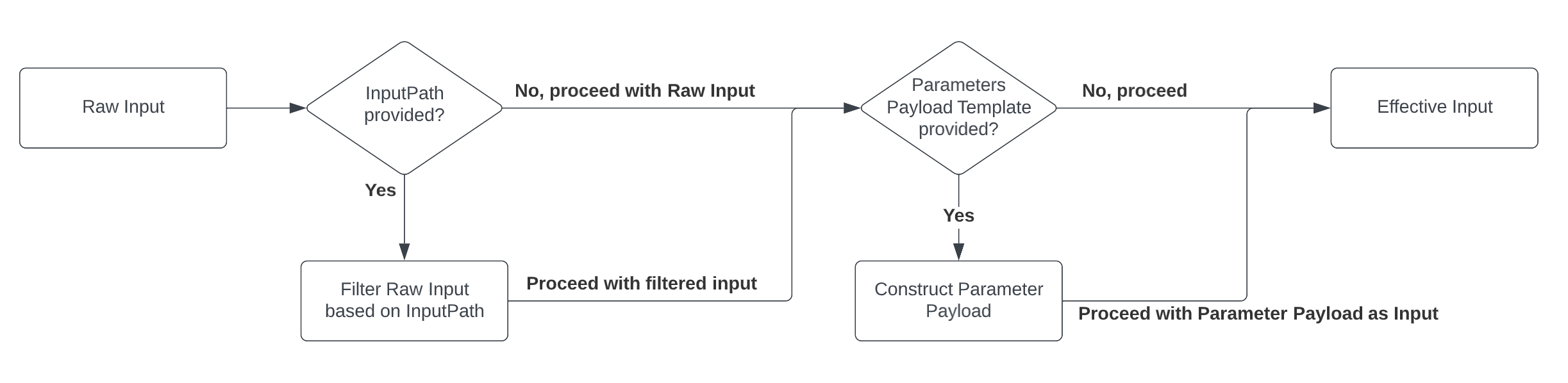
The following diagram depicts how the interpreter processes raw input to determine the effective input for a state
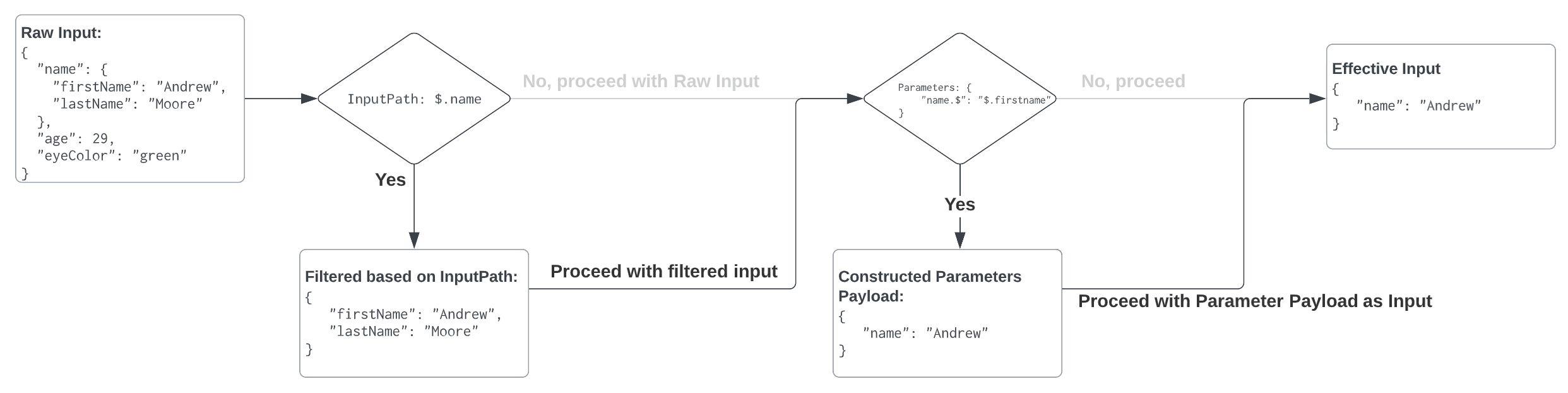
To illustrate this flow with an example, the following diagram depicts a scenario where both InputPath and Parameters are specified
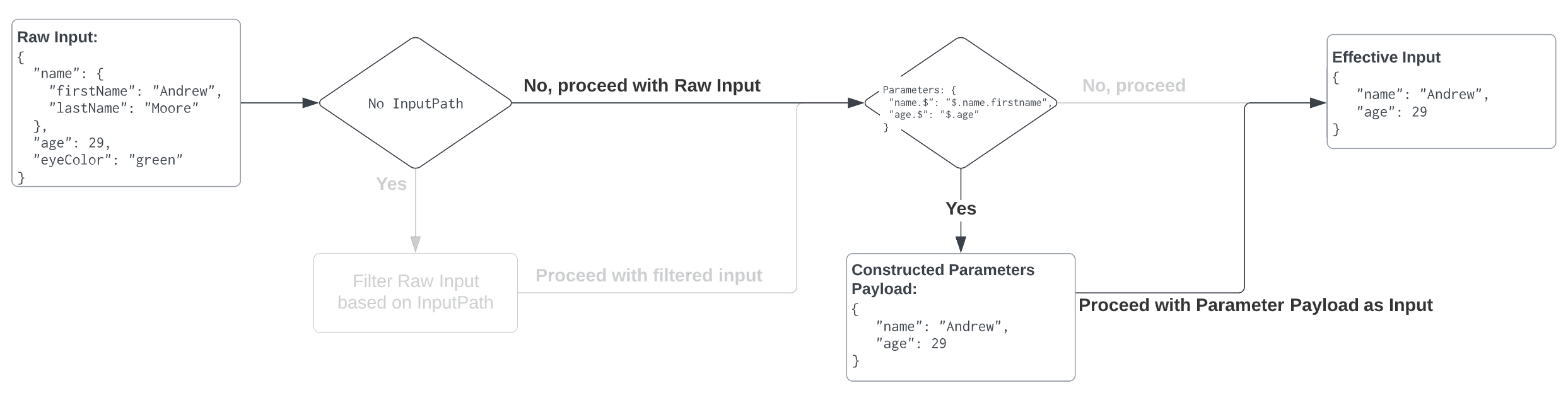
Finally, an example where the state definition omits the InputPath but still has specified Parameters
Result Processing Flow Diagrams
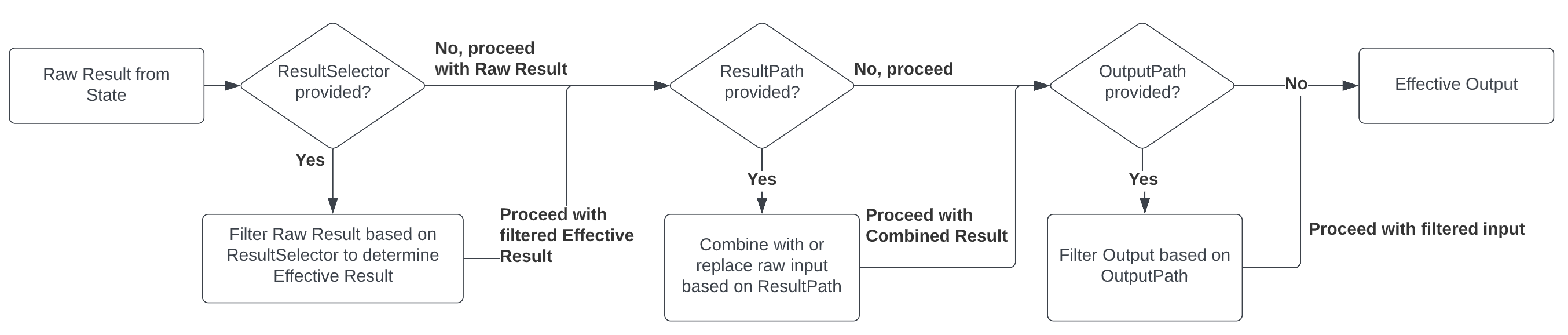
When a Task State completes its work, it returns the Raw State Result. At that point, the interpreter will check to see if the state has defined ResultSelector, ResultPath and/or OutputPath.
The following diagram depicts how the interpreter processes the Raw State Result to ultimately determine the Effective Output for the state.
Let's illustrate this flow with a few examples. Suppose we have a Task State that sends an OpenLink Command which reads 4 bytes of data from memory address 0x5004.
"ReadData": {
  "Type": "Task",
  "Resource": "OpenLink:SendCommand",
  "Parameters": {
    "MessageType": "01",
    "IsWrite": false,
    "RouteType": "Tool",
    "CommandBody": "500404"
  },
  "ResultSelector": "...", // Will vary by example
  "ResultPath": "...",     // Will vary by example
  "OutputPath": "...",     // Will vary by example
  "End": true
}
The following diagram depicts a scenario where ResultSelector, ResultPath, and OutputPath are omitted. In this case, the Raw State Result becomes the State's Effective Output.
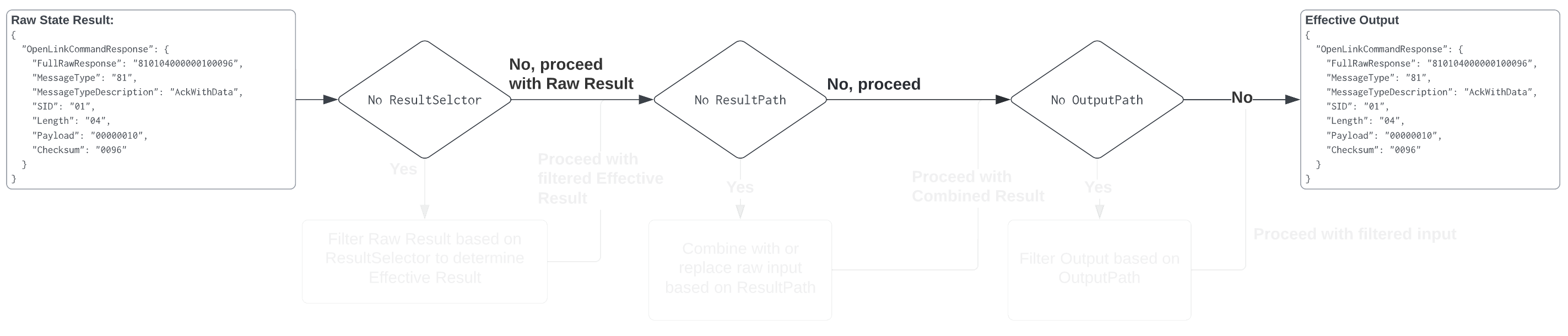
That's pretty straightforward. However, suppose the subsequent state requires information from both the original raw input as well as the result. In that case, a ResultPath could be specified. This will instruct the interpreter to take the result, and add it as a property on the original raw input object. The following diagram depicts this scenario.
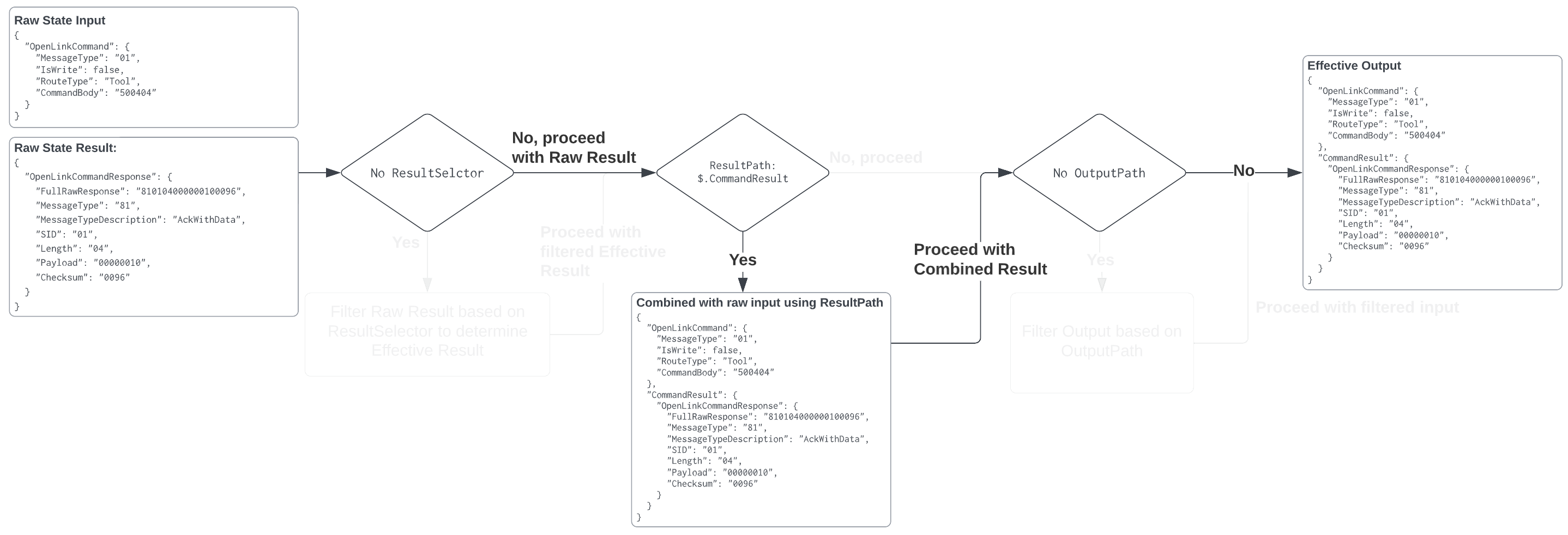
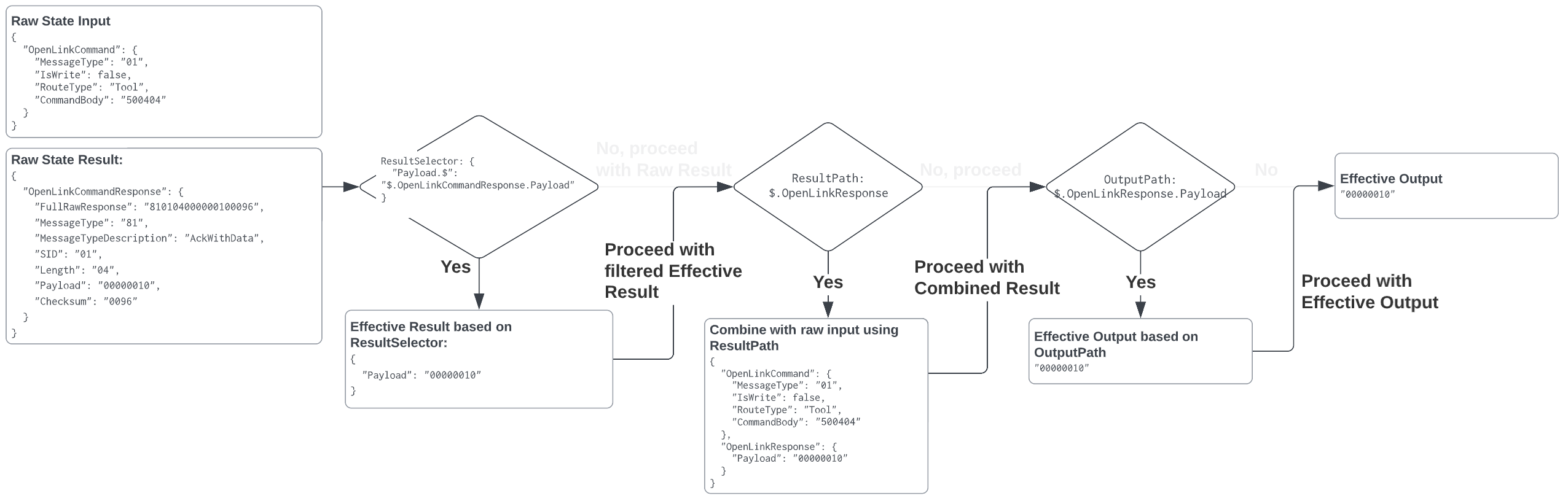
Lastly, suppose it is desired that our state output be just the payload of the response to the OpenLink Command. The following is an example that takes advantage of ResultSelector, ResultPath and OutputPath to accomplish this.
Input/Output Processing Examples
Read, Parse, and Display data from tool
Suppose we have a 6T Utility Crimper (0x0010), and we want to read and display the number of full pressure cycles.
Let's start with a state machine that just reads the data from the tool
{
  "Comment": "A state machine that reads the number of full pressure cycles from a crimper",
  "StartAt": "Read number of pressure cycles",
  "States": {
    "Read number of pressure cycles": {
      "Comment": "Read 4 bytes from memory address 0x5004",
      "Type": "Task",
      "Resource": "OpenLink:SendCommand",
      "Parameters": {
        "MessageType": "01",
        "IsWrite": false,
        "RouteType": "Tool",
        "CommandBody": "500404"
      },
      "End": true
    }
  }
}
If we executed the state machine above, its output would be:
{
  "OpenLinkCommandResponse": {
    "FullRawResponse": "810104000000100096",
    "MessageType": "81",
    "Payload": "00000010"
  }
}
Suppose next, that we really only care about the response payload and we'd like to convert it to a decimal number. We could add a Result Selector like so:
{
  "Comment": "A state machine that reads the number of full pressure cycles from a crimper and converts it to a decimal number",
  "StartAt": "Read number of pressure cycles",
  "States": {
    "Read number of pressure cycles": {
      "Comment": "Read 4 bytes from memory address 0x5004",
      "Type": "Task",
      "Resource": "OpenLink:SendCommand",
      "Parameters": {
        "MessageType": "01",
        "IsWrite": false,
        "RouteType": "Tool",
        "CommandBody": "500404"
      },
      "ResultSelector": {
        "FullPressureCycles.$": "States.SliceAndParseToNumber($.OpenLinkCommandResponse.Payload, 0, 4)"
      },
      "Next": "..."
    }
  }
}
Since "Read number of pressure cycles" specified a ResultSelector its output is modified to include the "FullPressureCycles" field that was defined.
Therefore, the state's output is:
{
  "FullPressureCycles": 123
}
Finally, suppose we wanted to instruct the interpreter to display this value in a dialog window. We could further extend this state machine like so:
{
  "Comment": "A state machine that reads the number of full pressure cycles from a crimper, converts it to a decimal number, then displays it in a dialog window.",
  "StartAt": "Read number of pressure cycles",
  "States": {
    "Read number of pressure cycles": {
      "Comment": "Read 4 bytes from memory address 0x5004",
      "Type": "Task",
      "Resource": "OpenLink:SendCommand",
      "Parameters": {
        "MessageType": "01",
        "IsWrite": false,
        "RouteType": "Tool",
        "CommandBody": "500404"
      },
      "ResultSelector": {
        "FullPressureCycles.$": "States.SliceAndParseToNumber($.OpenLinkCommandResponse.Payload, 0, 4)"
      },
      "Next": "Display Value"
    },
    "Display Value": {
      "Type": "Task",
      "Resource": "UI:Prompt",
      "Parameters": {
        "Title": "Full Pressue Cycles",
        "Message.$": "States.Format('Full pressure cycles: {}', $.FullPressureCycles)"
      },
      "End": true
    }
  }
}
Runtime Errors
Suppose a state's input is the string "foo", and its "ResultPath" field has the value "$.x". Then ResultPath cannot apply and the interpreter fails the machine.
Errors
Any state can encounter runtime errors. Errors can arise because of state machine definition issues (e.g. the "ResultPath" problem discussed immediately above), task failures (e.g. an exception thrown by a calculation) or because of transient issues, such as network events or loss of connection with a tool.
When a state reports an error, the default course of action for the interpreter is to fail the whole state machine.
Error representation
Errors are identified by case-sensitive strings, called Error Names. The Milwaukee Tool States Language defines a set of built-in strings naming well-known errors, all of which begin with the prefix States.
States MAY report errors with other names, which MUST NOT begin with the prefix "States.".
Fallback states
Task States and Map States MAY have a field named "Catch", whose value MUST be an array of objects, called Catchers.
Each Catcher MUST contain a field named "ErrorEquals", specified exactly as with the Retrier "ErrorEquals" field, and a field named "Next" whose value MUST be a string exactly matching a State Name.
When an State reports an error and either there is no Retrier, or retries have failed to resolve the error, the interpreter scans through the Catchers in array order, and when the Error Name appears in the value of a Catcher’s "ErrorEquals" field, transitions the machine to the state named in the value of the "Next" field.
The reserved name "States.ALL" appearing in a Retrier’s "ErrorEquals" field is a wildcard and matches any Error Name. Such a value MUST appear alone in the "ErrorEquals" array and MUST appear in the last Catcher in the "Catch" array.
Error output
When a state reports an error and it matches a Catcher, causing a transfer to another state, the state's result (and thus the input to the state identified in the Catcher’s "Next" field) is a JSON object, called the Error Output. The Error Output MUST have a string-valued field named "Error", containing the Error Name. It SHOULD have a string-valued field named "Cause", containing human-readable text about the error.
A Catcher MAY have an "ResultPath" field, which works exactly like a state’s top-level "ResultPath", and may be used to inject the Error Output into the state’s original input to create the input for the Catcher’s "Next" state. The default value, if the "ResultPath" field is not provided, is "$", meaning that the output consists entirely of the Error Output.
Here is an example of a Catcher that will transition to the state named "RecoveryState" if the Task state throws a OpenLinkCommand.Timeout error, or otherwise to the "EndMachine" state, which is presumably Terminal.
Also in this example, if the first Catcher matches the Error Name, the input to "RecoveryState" will be the original state input, with the Error Output as the value of the top-level "error-info" field. For any other error, the input to "EndMachine" will just be the Error Output.
"Catch": [
  {
    "ErrorEquals": [ "OpenLinkCommand.Timeout" ],
    "ResultPath": "$.error-info",
    "Next": "RecoveryState"
  },
  {
    "ErrorEquals": [ "States.ALL" ],
    "Next": "EndMachine"
  }
]
Each Catcher can specify multiple errors to handle.