Create
How to add a new product definition
Product definitions are currently managed in QuickLink Web.
When adding a new product, start by signing into the QuickLink environment at https://quicklink.milwaukeetool.com/products
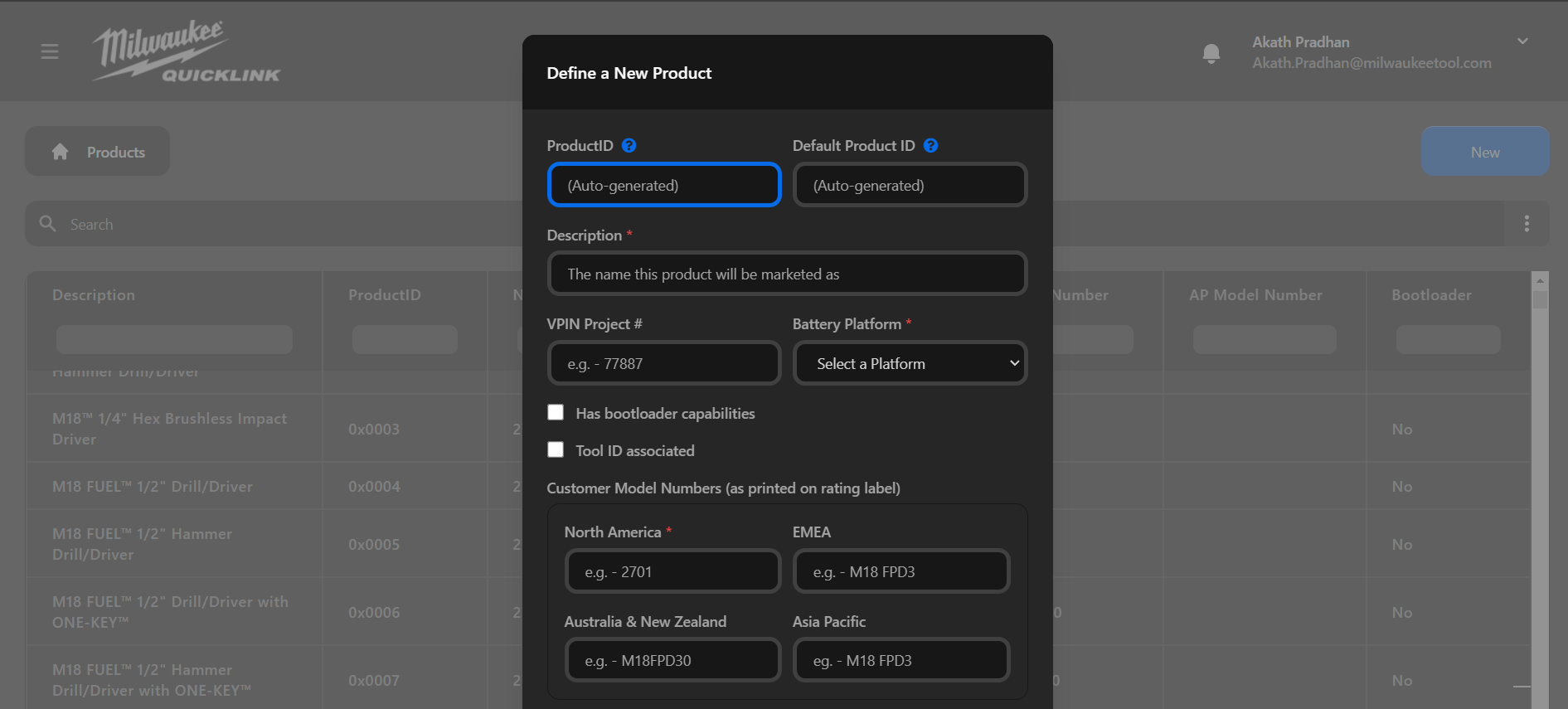
Click "New" and fill in the fields
Auto Generated Fields
Product ID:
The unique ID for that Base Model #
This is programmed to the PCBA on the production line Open Link Tool Console Station and overwrites the Default Product ID.
Each Base Model # should receive a unique Product ID.
Default Product ID:
The Product ID that is hard coded into the PCBA’s firmware. This is first read by the Open Link Tool Console Station to ensure proper PCBA is being used. It is then overwritten. Sometime there are multiple Base Model #s that have the same firmware. So the Default Product ID might be the same for multiple Base Model #s.
Required Fields
North America Model #:
Base model number that indicates bare product, not a kitted product as printed on the rating label of the product. For M18/M12 power tools, this often takes the format of ####-20. For M18 batteries, it is typically ##-##-####.
Additions and/or changes will be saved to both Test and Production. A product should be created prior to any manufacturing build being performed.
Other Notes:
- All ROW SKUs will have the same Product ID as their corresponding US SKU, unless otherwise called out in this document.
- If ROW SKUs have a unique PCBA design, a separate Product ID might be required in order to properly service.
- Service of PCBAs/product should be considered when assigning Product IDs.
Description:
The name this product will be marketed as.
Battery Platform:
The battery system this product is compatible with.
Bootloader:
Specify whether the product includes bootloader functionality. The default setting is "No."
Tool ID:
Indicate whether the product will be associated with a Tool ID QR code. The default value is "No".
Bluetooth Specific Fields
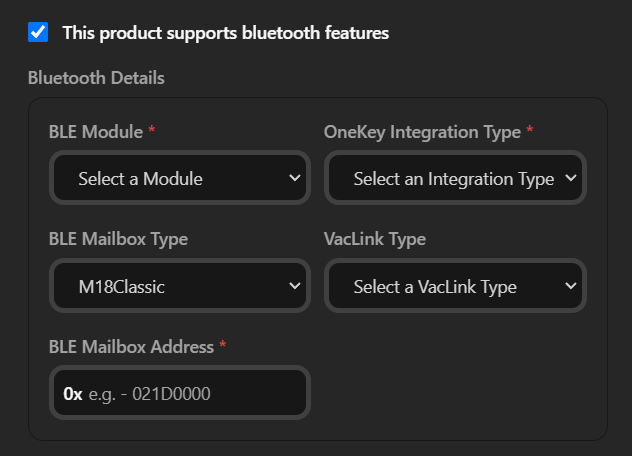
Specify if the product has Bluetooth functionality. The default setting is "No". If "Yes" is selected, complete the following fields if applicable.
BLE Module Type:
Select the type of BLE module installed in the product.
OneKey Integration Type:
How the product integrates with OneKey.
BLE Mailbox Type:
If the product supports BLE Mailbox Forwarding mechanism, select the type of BLE Mailbox.
Available options are:
- M18Classic - Used for M18 products
- OpenLinkPlus - Used with MX and M12 products
- TBD - To be determined
- None - No BLE Mailbox
BLE Mailbox Address:
The BLE Mailbox address to forward the open link commands to. Only required if BLE Mailbox Type is selected.
VacLink Type:
VacLink: A feature that allows a tool to wirelessly turn a vacuum on or off. Also known as Wireless Dust Control (WDC).
Available types are:
- VacLinkGen1
- VacLinkGen2 (An updated official name will be defined by the platform project next year)
- TBD - To be determined
- None - No VacLink support
External Data Logger Fields
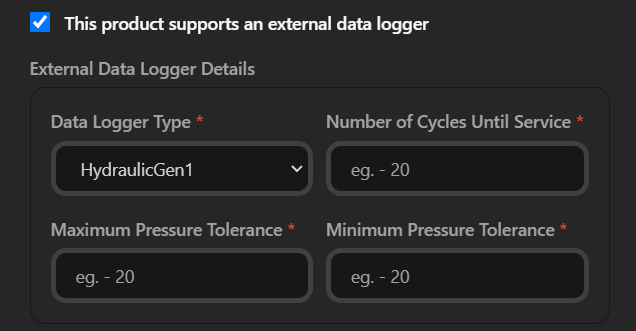
Specify if the product has an External Data Logger. The default setting is "No". If "Yes" is selected, complete the following fields if applicable.
Data Logger Type:
Select the type of external data logger supported by the product.
Available types are:
- HydraulicGen1: An older hydraulic data logger. Examples of compatible products include 2672, 2678, 2679, 2776, 2777, 2778, and 2779.
- HydraulicGen2: Very few hydraulic products use this data logger. Examples include M18 Hydraulic Pump 2774 and M18 Dieless Crimper 2877.
- HydraulicGen4: The most common hydraulic data logger. Examples include 2779, 2875, 2876, 2878, 2933, 2978, 2979, M18 HCT60, Conduit Bender, 125mm Non-Remote Cable Cutter, M18 Hydraulics Template Tool.
- MDL: Products that support Milwaukee Data Logger/Advanced Data Logger. Examples include 2842, 2944, 2945, 2964, 3049, 3401, 2405, 3406, 3450, 3771, 3777, 3967, M18HoleShooter, Gen 4 Reaction Arm Torque Wrench.
- DTW: M12 Digital Torque Wrench products. Examples include M12 Power Torque Wrench 3/8" Drive 2465 and M12 Power Torque Wrench 1/2" Drive 2466.
Hydraulic Number of Cycles Until Service:
The number of cycles until the product requires service. Only required if the Data Logger Type is set to HydraulicGen1, HydraulicGen2, or HydraulicGen4.
Hydraulic Maximum Pressure Tolerance:
The maximum pressure threshold a tool can handle, defined to ensure it delivers the required force without overshooting. Only required if the Data Logger Type is set to HydraulicGen1, HydraulicGen2, or HydraulicGen4.
Hydraulic Minimum Pressure Tolerance:
The lowest pressure limit that a tool can operate at while still meeting the required force output. Only required if the Data Logger Type is set to HydraulicGen1, HydraulicGen2, or HydraulicGen4.
Subsystem Fields
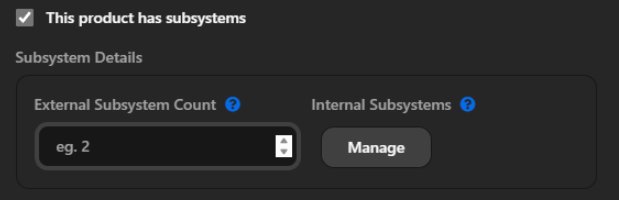
Distributed systems with multiple MCUs are becoming increasingly necessary with more complex products. In these systems, the MCUs might have to be connected to individually (ie. external subsystems), or they might be connected via an internal bus (ie. internal subsystems). There are two fields defined to manage these subsystems.
External Subsystem Count:
The number of MCUs in the product that can be connected to individually, excluding the BLE module. If not specified, the default value is assumed to be 1, which is the main Tool MCU. These can be considered external to differentiate from the internal subsystems. A tool will only have external OR internal subsystems, not both.
Internal Subsystems:
These are MCUs that are connected internally and can be communicated to via a "Gateway" MCU using the Gateway Access (0x07) OpenLink Command. Each internal subsystem has a node id and a name. The node id is used as the "destination" in the Gateway Access command to forward to the subsystem.
Miscellaneous Fields
Product Type:
Select the product type from the dropdown list. The default value is "TBD".
Notes:
- IOTSpecific encompasses Specific BLE modules, Embedded Ticks, OneKey cards, Tracking Tags, as well as upcoming devices like Cellular Trackers and Gateways.
- PortablePower includes Roll Ons, etc.
- Other includes items such as Pucks and miscellaneous entries in the product table, like "Ope Bucket of test," "Metco Datalogger," "PCBA Datalogger," "HD PoSA phase 2," and "test tool."
Mock Product:
Indicate whether the product is a mock/test product. The default value is "No".
OneKey Support:
Indicate whether the product supports OneKey. The default value is "TBD".
There can be VacLink products that have a BLE module but do not support OneKey.
Platform Codebase Version:
The version of the platform codebase that the product is built on. The default value is "TBD".
- M12 and M18 products use the UCB codebase, with versions tracked at the X.Y level. For example, M18 products may use UCB 2.0, UCB 2.4, UCB 2.5, etc.
- Older generation of MX products are based on MX1.1. Newer generation of MX products will use UCB, but this is still a work in progress.
- Batteries use a different code base altogether, so set to "TBD" for now.
PSE Major Revision:
Indicate if the project went through a tear-up.
Any PSE efforts to upgrade BLE modules from BLE113 to BGM220, or similar projects, are classified as a "PSE tear-up." If a tool originally has a BLE113 module and is later upgraded to BGM220 by PSE, this field will be marked as "Yes," and details about the old BLE module will be added to the notes section.
Non-Serializable:
Indicate whether the product goes through the End-of-line (EOL) serialization process.
Notes Field
Include any additional notes or information about the product in the Notes field.